I am documenting a Hermes Agent build on yeremiachris.com in public. This is part 1.
By the end of this post you should understand what an agent is (in plain language), why I picked a small stack, and what is already running today: a Biznet GIO VM, DeepSeek as the model API, and a Hermes Discord gateway that replies in my server (including a real checkpoint thread with /sethome). What you will not get here: copy-paste terminal dumps, line-by-line config.yaml tours, or a production security audit. Part 2 is where I go deeper on hardening, cron, skills, and tight allowlists.
If you are a recruiter skimming for signal: I am not just “using ChatGPT.” I self-host an agent on a VPS, wire it to Discord, and pay attention to secrets and cost. If you are an engineer new to agents: short sections, one idea at a time.
The one-line pitch
Hermes Agent is open-source software that runs on a machine you control, talks to a model API, uses tools, remembers context, and can improve reusable “skills” over time. Part 1 is the full “it works in Discord” milestone. Part 2 is making it boringly safe to leave on 24/7.
What is Hermes Agent — and how is it not “just a chatbot”?
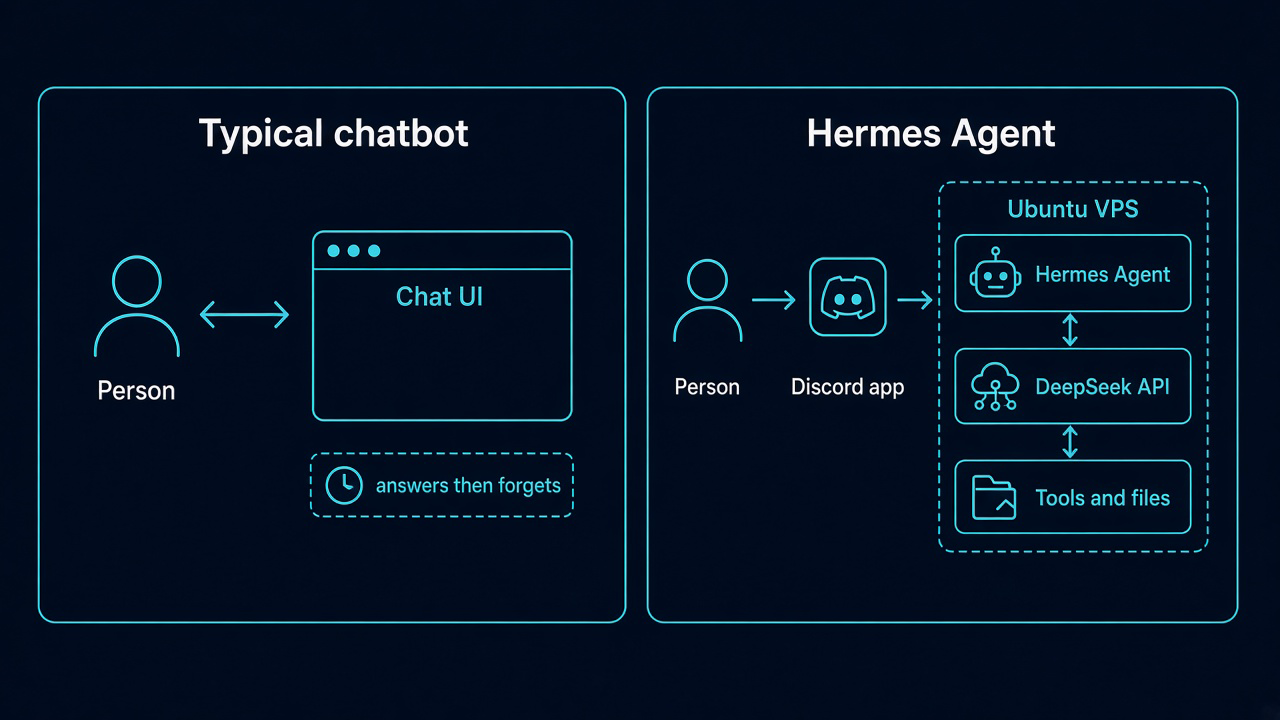
A browser chatbot is a tab: you type, it replies, the session ends. An agent is closer to a small employee with permissions.
Hermes Agent (Nous Research) can:
- Run tools — read files, run commands, schedule jobs, and more (within limits you configure).
- Remember across sessions — search old conversations instead of starting from zero every morning.
- Accumulate skills — reusable instructions the project can refine over time (the docs call this a self-improving loop).
| Classic chatbot | Hermes-style agent | |
|---|---|---|
| Memory | Mostly “this tab only” | Can recall prior sessions and saved notes |
| Actions | Answers text | Can act on a server (tools) |
| Growth | Static FAQ | Can add or tune skills from experience |
Hermes also does not lock you to one model vendor. For this build I use the DeepSeek API. The VPS is the body; the API is the brain you can swap later.
What would I actually use it for?
These are the use cases that motivated the project:
- Always-on assistant on a VPS instead of keeping my laptop awake 24/7.
- Discord as the front door — guild threads and DMs, not Telegram for this series.
- Scheduled routines — daily digests or audits via Hermes cron (more in part 2).
- Delegation — subagents when a job splits cleanly.
- Portable skills — aligned with agentskills.io.
Part 1 ends with Hermes installed, gateway running, and Discord answering. Part 2 is polish, not “finally turn it on.”
Stack: separate brain and body
| Layer | Choice | Role in this build |
|---|---|---|
| Model | DeepSeek API | Inference; billed per token |
| Compute | Biznet GIO Cloud — Hermes (MS 4.2 / NEO LITE) | Ubuntu VM hosting Hermes + gateway |
| Channel | Discord (HermesYeremia / yeremiachris#8944) | Where I talk to the agent |
Official docs also support Docker, SSH backends, Modal, and more. A modest monthly VM was enough to get to a live gateway without over-engineering day one.
Picking a VPS: what I compared, what I bought
Early notes mentioned overseas options (OVH, DigitalOcean). What I run today is Biznet GIO Cloud in Indonesia — IDR billing and a panel I already use.
| Provider | Vibe | Note |
|---|---|---|
| DigitalOcean | Polished tutorials | Common default in English posts |
| Hostinger | Promos | Confirm real VPS, not shared hosting |
| OVH | Cheap EUR/USD entry | I considered it early on |
| Biznet GIO Cloud | Indonesian cloud | NEO Lite — compute named Hermes |
My Biznet GIO compute — real numbers from the dashboard
- Log into Biznet GIO Cloud.
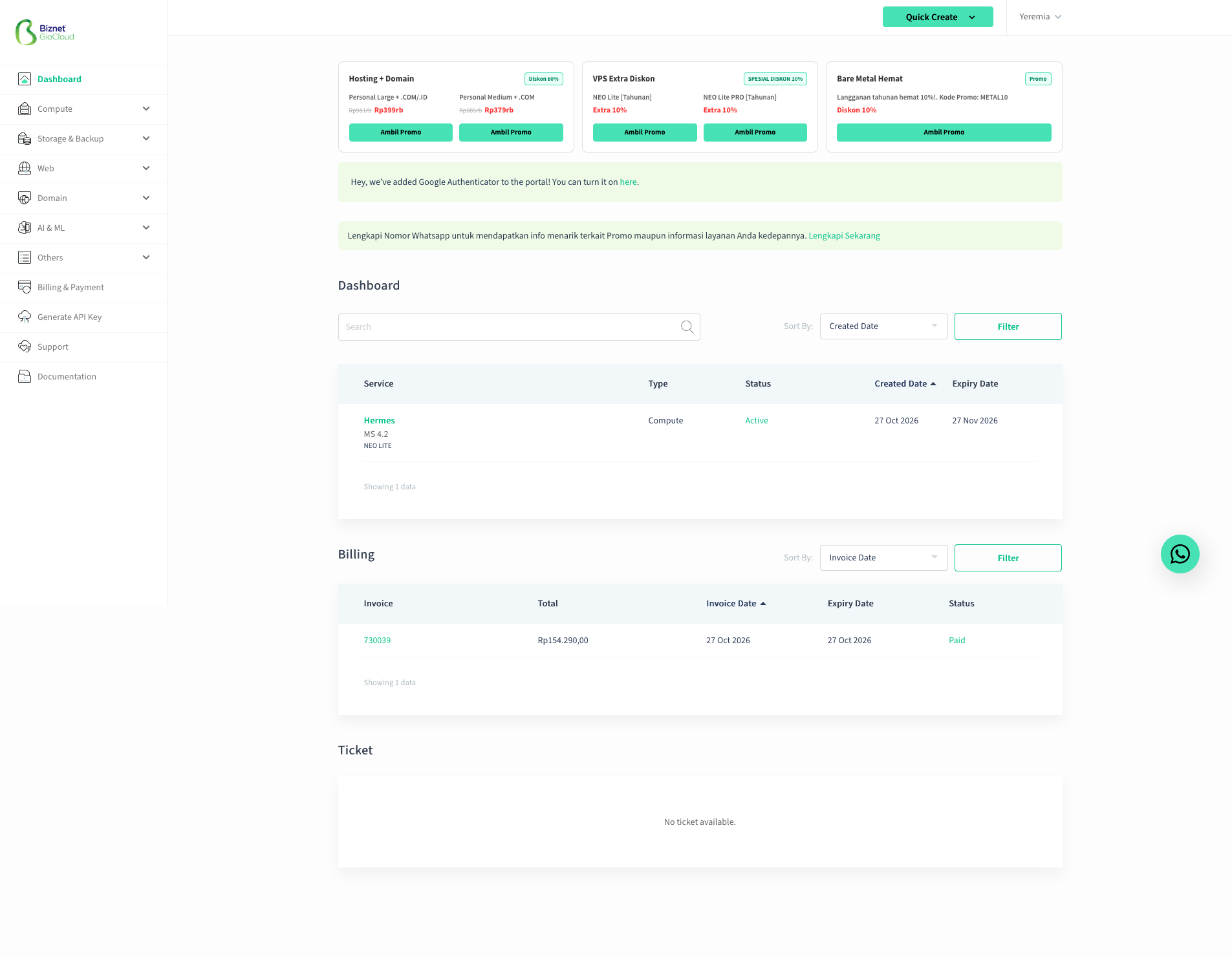
- Quick Create → Compute → NEO Lite / MS 4.2.
- Name the instance Hermes; pay; wait until status is Active.
| Field | Value |
|---|---|
| Service name | Hermes |
| Plan | MS 4.2 / NEO LITE |
| Status | Active |
| Created / expiry | 27 Oct 2026 → 27 Nov 2026 (monthly) |
| Invoice (optional) | #730039 — Rp154.290 (paid) |
For any SSH example in this post, use a placeholder IP only — e.g. 203.0.113.10 (RFC 5737) — never a real public address.
ssh ubuntu@203.0.113.10How Hermes landed on the Biznet VM (high level, no fake logs)
I followed the official Hermes Agent docs — two supported paths, same idea: install software, run setup, point at a model, start the gateway.
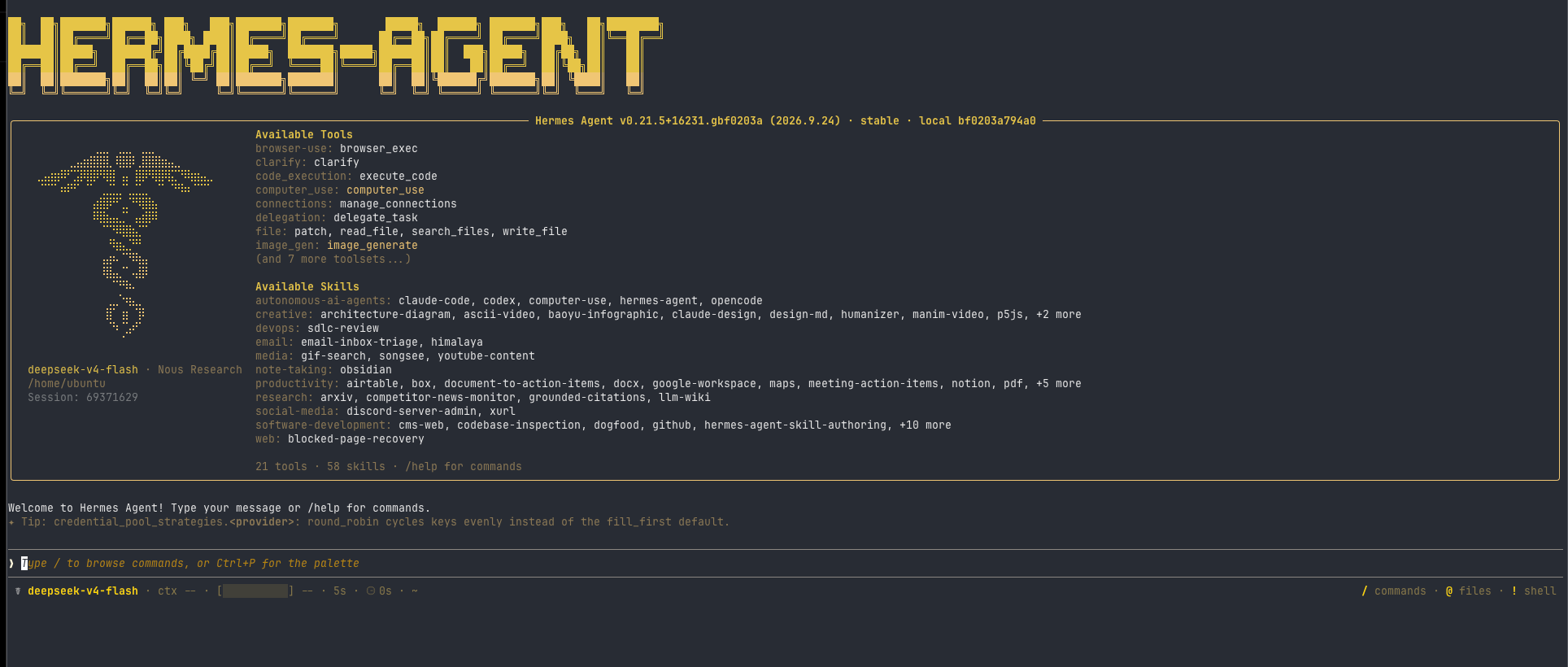
After setup, the Hermes TUI is the “this is real” moment — not a bland API wrapper. On my VM it shows Hermes Agent v0.21.5, model deepseek-v4-flash, and a live summary of 21 tools and 58 skills (browser, code execution, Discord admin, GitHub, and more). Window chrome is cropped in the screenshot so no host/IP leaks into a public post.
Path A — install script (what the docs recommend on Linux)
- SSH into the Ubuntu VM (placeholder IP above).
- Run the published installer (from the docs):
curl -fsSL https://hermes-agent.nousresearch.com/install.sh | bash - Run
hermes setup(or the interactive setup the installer walks you through). - Put secrets in
.envon the server — DeepSeek API key, Discord bot token — not in Git. The docs stress provider keys live in env, not in committed config. - Point Hermes at DeepSeek (provider env /
hermes modelflow per docs). - Configure Discord: application token plus allowed users (Hermes defaults to deny strangers — keep it that way).
- Start the gateway:
hermes gateway setup, then run the gateway process (docs:hermes gateway/ status checks withhermes gateway status).
I am not pasting my terminal session here. If you are following along, treat the doc pages as source of truth for exact flags this week.
Path B — Docker (same lifecycle, containerized)
Docs also document a Docker image (nousresearch/hermes-agent): run setup once with a volume for ~/.hermes, then run gateway supervised in the container with that same volume. Good when you want a clean rollback boundary on a small VPS.
What “done” meant for part 1
- Hermes process + Discord gateway running on the Biznet box.
- DeepSeek key on the server (see usage below).
- Bot yeremiachris visible online in the guild.
- A real conversation proving the gateway is live — not a mock.
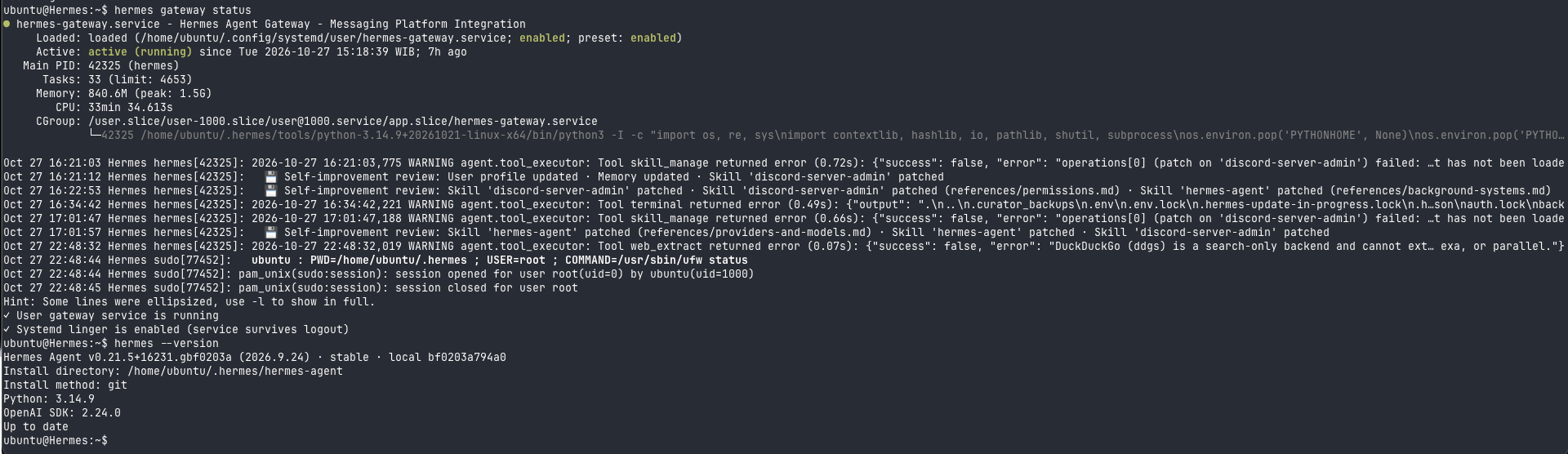
CLI proof on ubuntu@Hermes: one terminal capture shows hermes gateway status (hermes-gateway.service active (running) since 2026-10-27 ~15:18 WIB, systemd linger on) and hermes --version (v0.21.5+16231.gbf0203a, git install, Python 3.14.9, up to date).
DeepSeek API (brain prep + real usage)
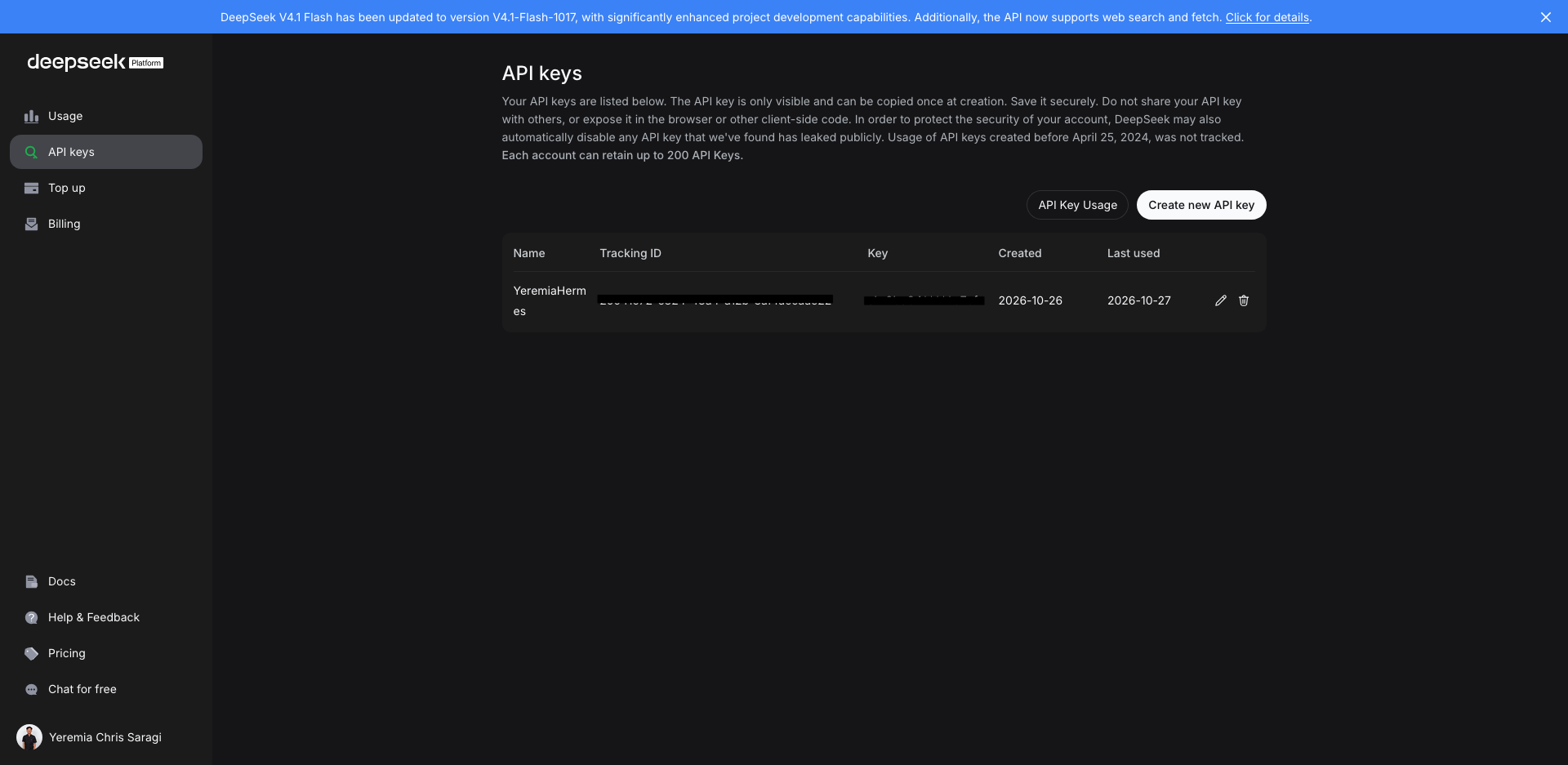
- Create a key at platform.deepseek.com.
- Store it in a password manager and in the server
.envonly.
Key name YeremiaHermes (created 2026-10-26, last used 2026-10-27); secrets redacted in the screenshot.
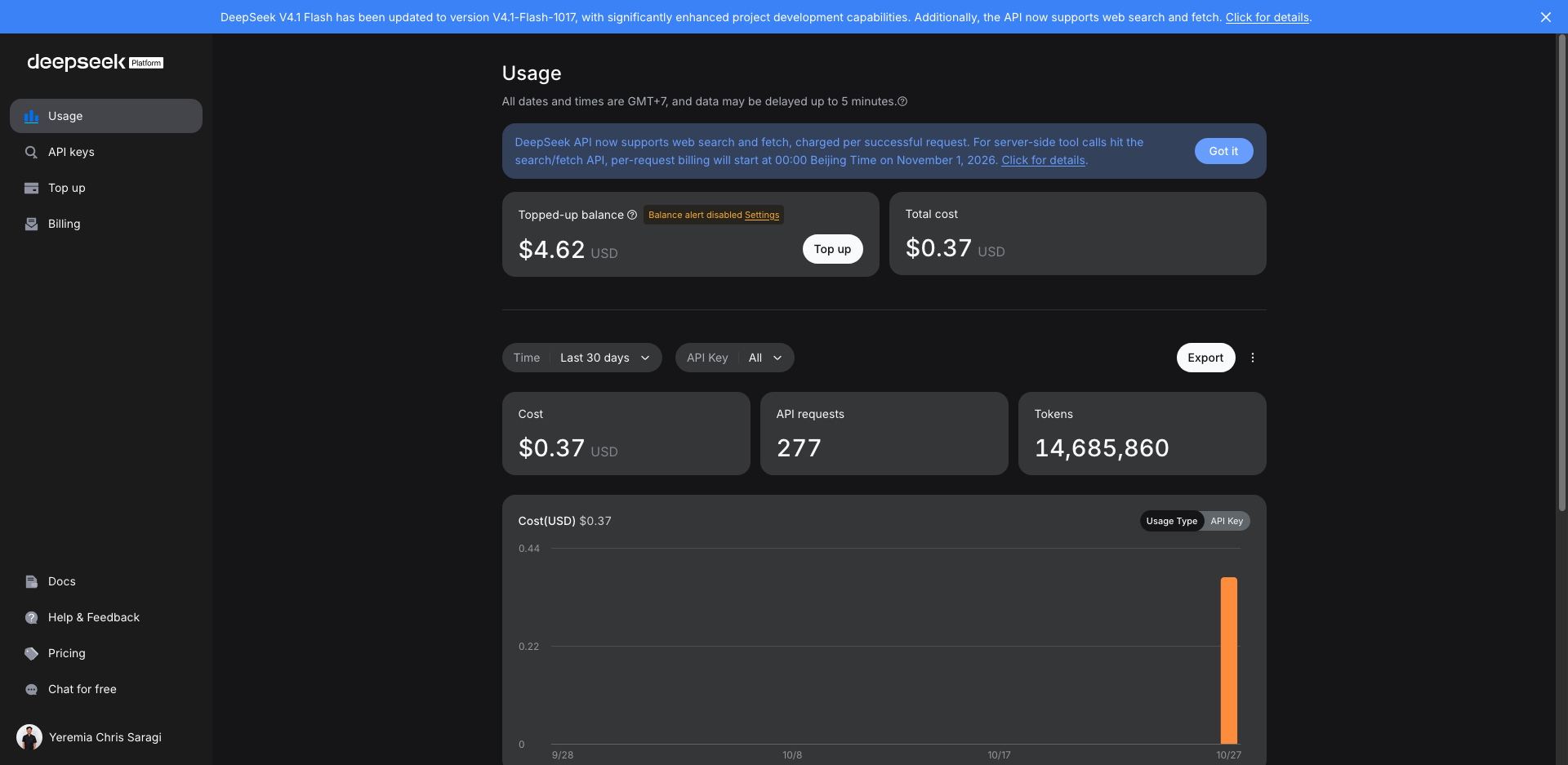
Cost check (last 30 days): about $0.37, 277 requests, roughly 14.7M tokens — experimentation while wiring Hermes and Discord. Set budget alerts in the dashboard.
Discord: application setup + proof the gateway is live
Developer Portal (bot identity)
Application HermesYeremia, bot yeremiachris#8944. Public Bot on; Server Members Intent and Message Content Intent on; Presence off. Token never appears in screenshots — only Reset Token.
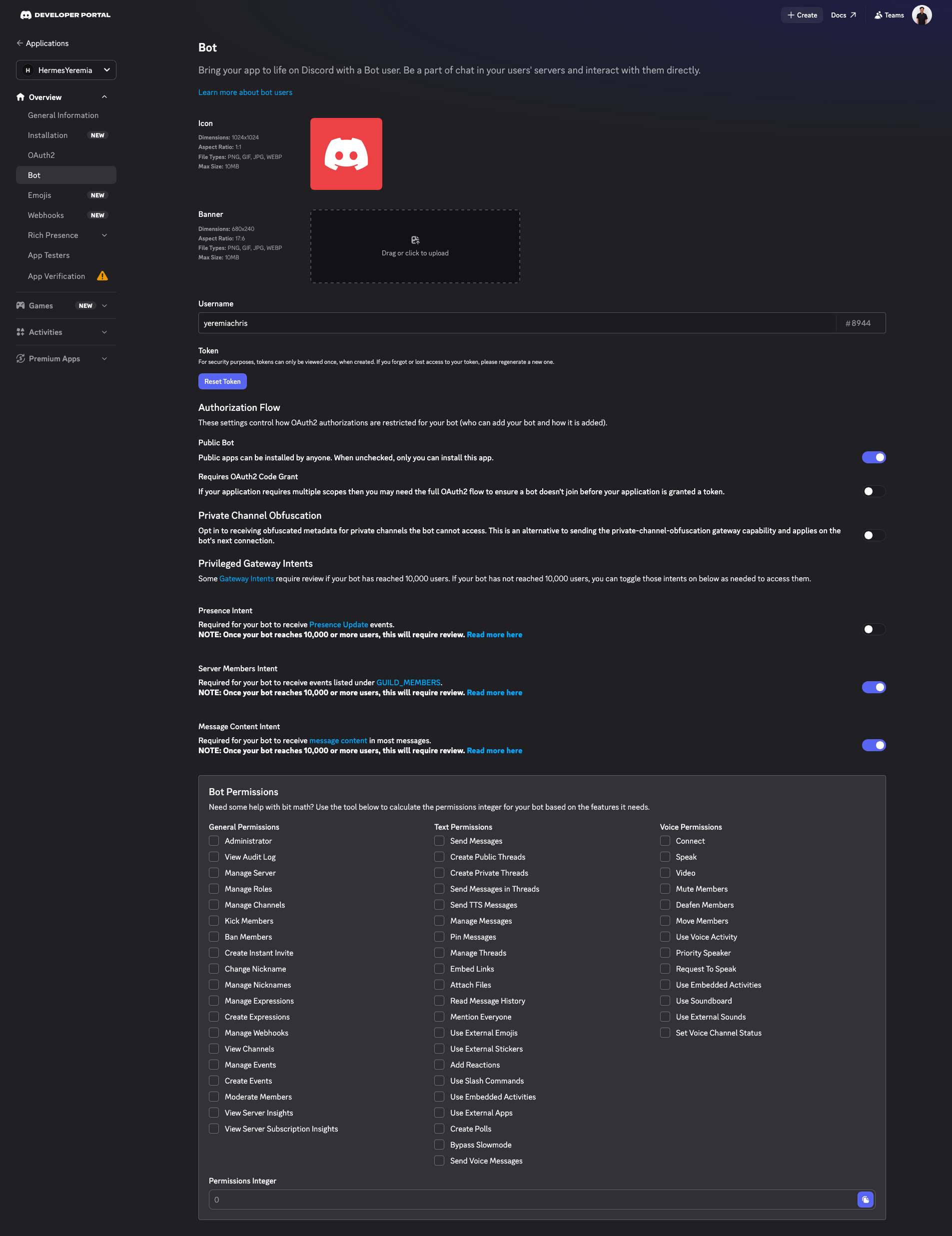
Prep checklist (no tokens in this post):
- Create app → enable bot user.
- OAuth2 URL Generator → invite to your guild with the scopes you need.
- Store the bot token server-side only.
- Configure Hermes allowed users so random guild members cannot drive tools.
Note on other integrations: I have experimented with Composio-style webhooks elsewhere. The checkpoint below is Hermes gateway behavior (home channel / /sethome), not a separate Grok-only bot script.
Checkpoint thread (gateway is answering)
In #news, thread Install Hermes Agent on Biznet GIO VPS, I @mentioned yeremiachris with a part 1 status line. The bot replied that no home channel was set and suggested /sethome — exactly the kind of message you expect from a running Hermes Discord integration.
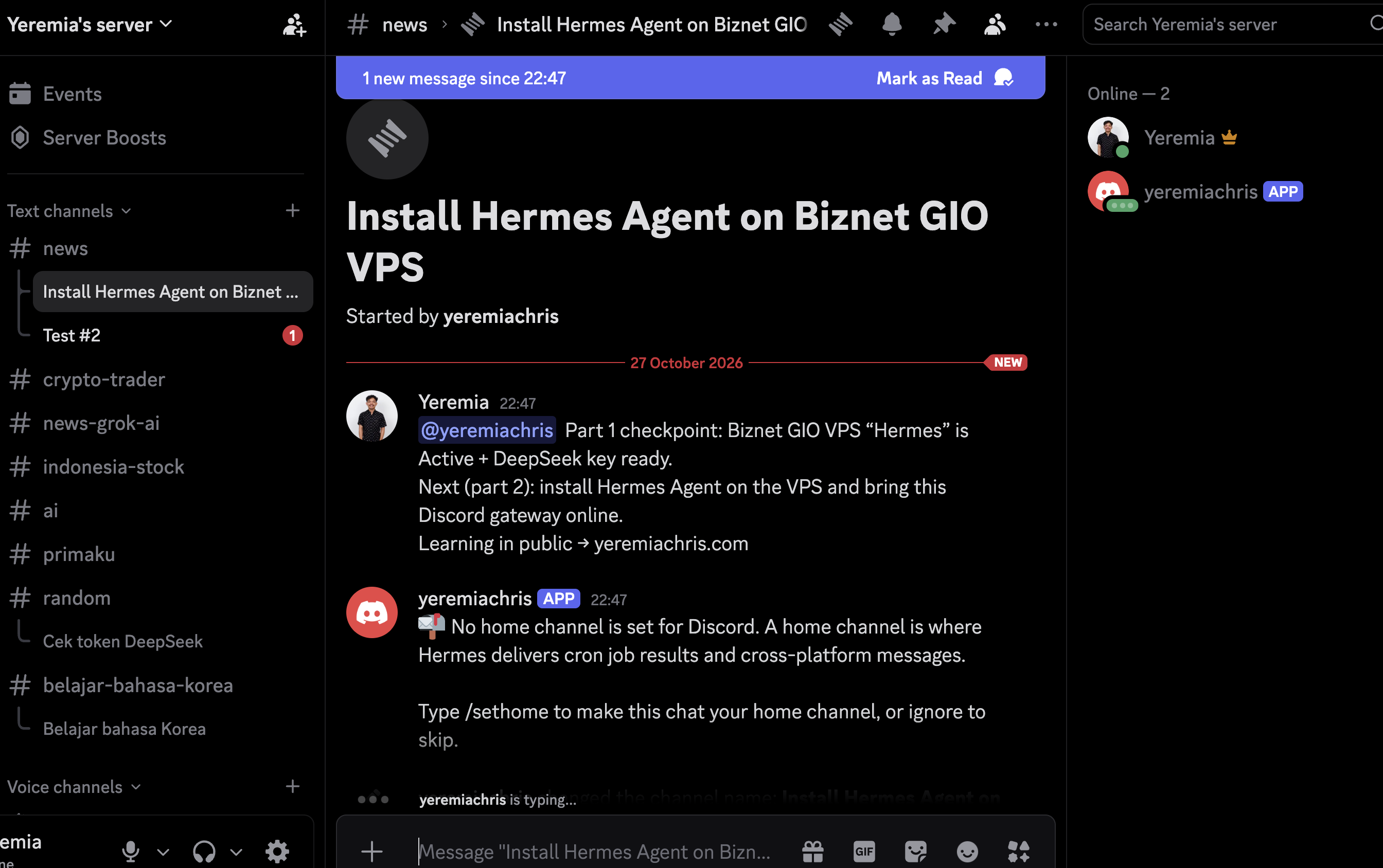
That screenshot is the honest “it is live” proof for this post.
What part 1 deliberately skips
Learning in public still needs boundaries:
- No full SSH hardening write-up (firewall, non-root, unattended upgrades).
- No exhaustive tool allowlist or sandbox egress story.
- No cron recipes or skills folder tour.
- No invented CLI transcripts.
- No real public IPs.
Part 1 = working stack + live Discord. Part 2 = make it safe to leave on.
Part 1 scorecard
| Done in part 1 | Part 2 (next) |
|---|---|
| Hermes vs chatbot mental model | SSH hardening, firewall, deploy user |
| Biznet GIO Hermes VM Active | Tighter DISCORD_ALLOWED_USERS / gateway allowlists |
| Hermes installed + gateway running on VM | Docker sandbox / toolset minimalism per docs |
| DeepSeek on server; usage ~$0.37 / 14.7M tokens (30d) | Cron jobs + delivery to Discord |
Discord app configured; gateway replies (/sethome) | Skills, memory write gates, audit logging |
| Architecture + dashboard screenshots | Deeper cost and threat-model notes |
What comes in part 2
The agent already answers in Discord. The next post focuses on production hygiene, not first boot:
- Harden the Biznet VM — keys-only SSH, updates, least-privilege user.
- Lock down the gateway — explicit allowlists, no
*_ALLOW_ALL_USERSshortcuts. - Cron and skills — one real scheduled routine and a documented skills folder.
- Observability — what to log when an agent can run tools.
If you are following along, part 1’s inventory is: VM Active, Hermes + gateway up, DeepSeek wired, Discord proof in a thread. Part 2 is why I would trust it while I sleep.
See you in the hardening post.